
فئات
بلوق جديد
طريقة توصيل مروحة التيار المستمر بثلاثة أسلاك وتعريفاتها
December 08 , 2025مروحة ثلاثية الأسلاك مروحة تيار مستمر مصممة عادةً لتوفير الطاقة والتحكم الوظيفي بأقل قدر من الأسلاك. إن معرفة دور كل سلك، وفهم اصطلاحات الألوان الشائعة، والتوصيل الصحيح للأسلاك أمر ضروري لسلامة الجهاز وطول عمر المروحة. يشرح ما يلي تعريفات الأسلاك، وطرق التوصيل العملية، وكيفية استخدام تعديل عرض النبضة للتحكم في السرعة وردود فعل مقياس سرعة الدوران، واختلافات ألوان الشركات المصنعة، ونصائح السلامة لمساعدتك على تجنب الأخطاء أثناء التثبيت أو الاستبدال
التعريفات الأساسية والألوان النموذجية
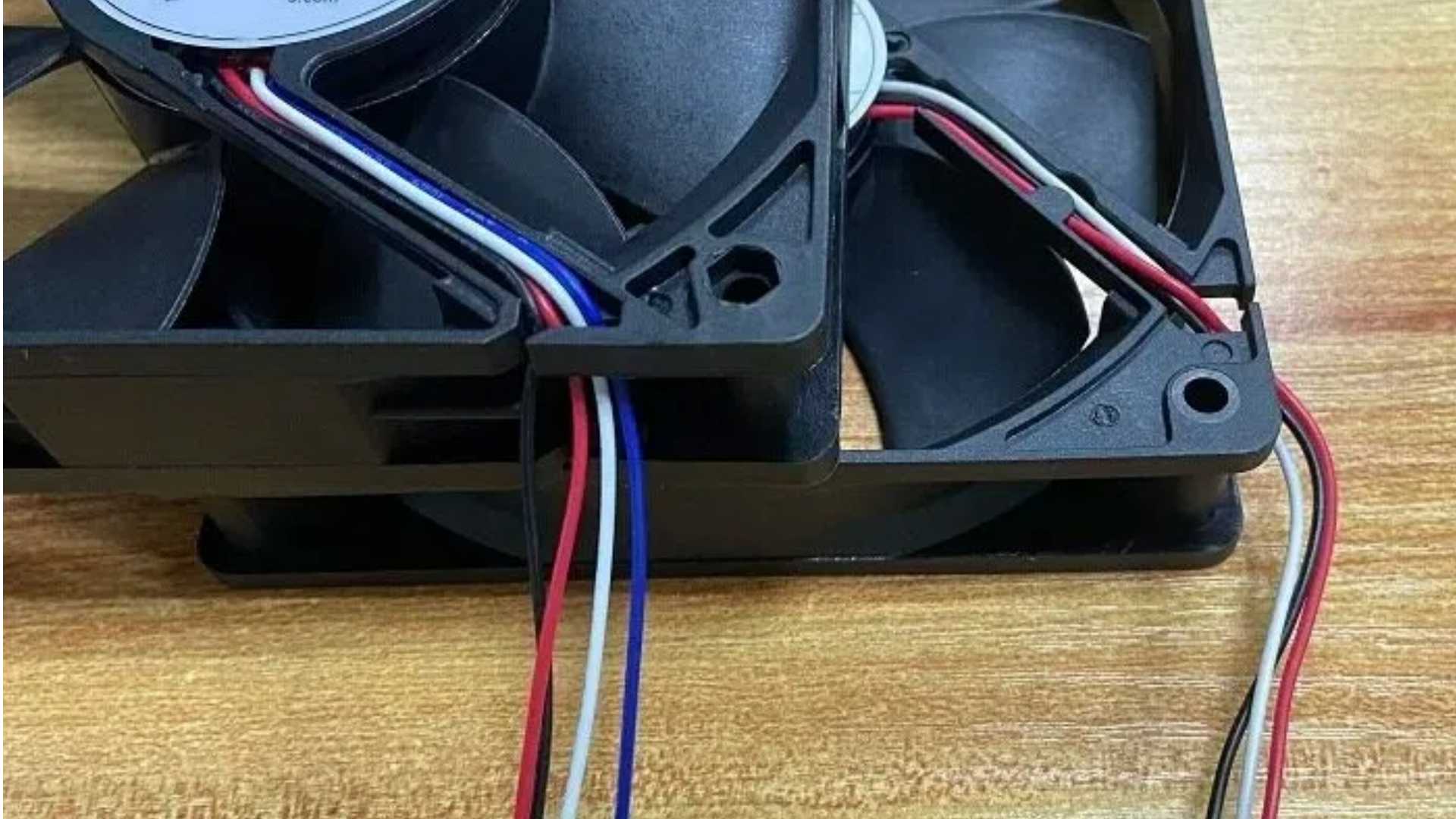
في معظم مراوح علب الكمبيوتر ومراوح التيار المستمر العامة، تؤدي الأسلاك الثلاثة وظائف محددة. اثنان منها أسلاك طاقة - أحدهما موجب والآخر سالب - والثالث خط إشارة وظيفي يُستخدم للتحكم في السرعة أو لتوفير تغذية راجعة لها. تُستخدم الألوان الشائعة كالتالي: الأحمر للموجب (VCC)، والأسود للسالب (GND)، والأصفر لخط الإشارة المستخدم إما لإخراج مقياس سرعة الدوران أو للتحكم في عرض النبضة (PWM). مع ذلك، لا يُعد اللون معيارًا صناعيًا موحدًا. فبعض الشركات المصنعة تستخدم ألوانًا مختلفة لوظائف محددة. على سبيل المثال، قد تستخدم شركة ما اللون الأزرق للتحكم في عرض النبضة (PWM) بينما تستخدم اللون الأصفر لإخراج مقياس سرعة الدوران أو الإنذار. لذا، يُنصح دائمًا بالرجوع إلى ورقة بيانات المروحة أو وثائق الشركة المصنعة عند استخدام طراز أو علامة تجارية مختلفة.
إجراءات التوصيل (دليل عملي)
قبل التوصيل، تأكد من تطابق جهد التغذية مع الجهد المقنن للمروحة، وجهّز أدوات العزل المناسبة. وصّل السلك الأسود بأرضي النظام أو مصدر الطاقة أولًا. ثم وصّل السلك الأحمر بالقطب الموجب لمصدر الطاقة، مع ضمان التوصيل المحكم وتجنب حدوث ماس كهربائي. يجب توصيل سلك الإشارة الثالث بمنفذ التحكم أو المراقبة. إذا كان للتحكم في سرعة المروحة بتقنية تعديل عرض النبضة (PWM)، فوصله بمخرج يدعم هذه التقنية؛ أما إذا كان لتغذية عداد دورات المحرك، فوصله بمدخل يدعم إشارات المجمع المفتوح أو الموجة المربعة. على سبيل المثال، عند استخدام لوحة تطوير مثل أردوينو، وصّل السلك الأحمر بـ VCC، والأسود بالأرضي، وسلك الإشارة بمخرج PWM أو بمدخل رقمي يدعم عدّ النبضات. بعد التوصيل، شغّل المروحة واختبر استجابتها لإشارات التحكم أو إرسالها نبضات سرعة الدوران الصحيحة.
أساسيات التحكم في السرعة بتقنية PWM ومقياس سرعة الدوران
يُعدّ التحكم بتقنية تعديل عرض النبضة (PWM) من أكثر الطرق شيوعًا لتنظيم سرعة مروحة التيار المستمر. فبدلًا من تغيير الجهد، تُغيّر تقنية PWM دورة التشغيل لضبط متوسط طاقة الإدخال للمروحة، وبالتالي سرعتها. استخدم ترددات PWM ودورات التشغيل ضمن النطاقات الموصى بها في ورقة بيانات المروحة لتجنب التشويش أو التلف المبكر. عادةً ما تستخدم تغذية مقياس سرعة الدوران مستشعر هول أو خرجًا مفتوح المجمع، مما يُنتج نبضة موجة مربعة لكل دورة أو كل بضع دورات. من خلال قياس تردد النبضات، يحسب المتحكم عدد الدورات في الدقيقة (RPM). وبالتالي، يُوفّر سلك الإشارة هذه النبضات، ويقيس المتحكم الفاصل الزمني بين النبضات لتحديد السرعة الحالية.
الاختلافات بين الشركات المصنعة وأهمية جداول البيانات الفنية
قد تختلف الشركات المصنعة في تخصيص الألوان والوظائف. على سبيل المثال، قد يستخدم بعض الموردين اللون الأزرق للتحكم في تعديل عرض النبضة (PWM)، واللون الأصفر لمراقبة سرعة الدوران أو لإخراج الإنذارات. قد تتضمن المراوح الصناعية وظائف إشارة إضافية، مثل عرض درجة الحرارة أو إنذارات الأعطال، وهي ميزات أقل شيوعًا في مراوح أجهزة الكمبيوتر الشخصية. لتجنب تلف اللوحة الأم أو وحدة التحكم أو المروحة نفسها، اقرأ ورقة بيانات المروحة ومخطط الأسلاك بعناية قبل إجراء أي توصيلات. إذا كانت ورقة البيانات غير واضحة، فاتصل بالدعم الفني للشركة المصنعة للتأكد.
الأخطاء الشائعة ونصائح لحل المشكلات
من الأخطاء الشائعة افتراض أن السلك الثالث هو دائمًا مدخل PWM وتوصيله بمخرج غير متوافق، مما قد يؤدي إلى توقف المروحة عن الاستجابة أو تلفها. خطأ آخر هو توصيل خط مقياس سرعة الدوران بمصدر الطاقة لتجاوز التحكم، مما قد يُتلف دائرة الاستشعار. يجب أن تبدأ عملية استكشاف الأخطاء وإصلاحها بفصل الطاقة: تحقق من استمرارية الأسلاك وتأكد من الفولتية باستخدام جهاز قياس متعدد. إذا تلقت المروحة التيار الكهربائي الصحيح ولكن سرعتها لم تتغير، فتحقق من أن نوع خرج وحدة التحكم يطابق ما تتوقعه المروحة (على سبيل المثال، مخرج مفتوح مقابل دفع-سحب). إذا كانت قراءات سرعة الدوران غير منتظمة، فافحص شكل موجة النبضة؛ يمكن أن يساعد إضافة مقاومة سحب لأعلى أو استخدام مدخل التقاط متوافق في استقرار القياسات.
ممارسات السلامة والتوصيات النهائية
افصل التيار الكهربائي دائمًا واتخذ احتياطات مضادة للكهرباء الساكنة قبل القيام بأي عمل كهربائي. تجنب ترك الموصلات المكشوفة في أماكن معرضة للتلامس أو الاحتكاك، واستخدم أنابيب الانكماش الحراري أو أربطة الكابلات عند الحاجة. إذا لم تكن لديك خبرة كافية في التعامل مع الأسلاك الكهربائية أو كان الجهاز ذا قيمة عالية، فاستعن بفني متخصص لإجراء التركيب. في أي عملية تعديل أو استبدال، اتبع توصيات الشركة المصنعة للجهاز، واحتفظ بسجلات طراز المروحة وبياناتها الفنية للصيانة أو الاستبدال في المستقبل.
بصفتها شركة تصنيع محترفة وموثوقة في صناعة التبريد، تلتزم تشونغفو بتقديم أداء مستقر ومعايير جودة عالية لعملائها في جميع أنحاء العالم. بالإضافة إلى مراوح التيار المستمر، نقوم أيضًا بتصنيع مجموعة واسعة من منتجات تدفق الهواء، بما في ذلك مراوح التدفق المتقاطع ، منفاخات طرد مركزي ، مراوح EC، وحلول مراوح صناعية متنوعة تُستخدم في الأجهزة المنزلية، وأجهزة الاتصالات، وأنظمة التحكم الذكية، والمعدات الصناعية. اختيار Chungfo يعني الحصول على أداء منتج موثوق، ودعم فني شامل، وحلول تبريد مصممة خصيصًا لتطبيقاتك. تواصل معنا اليوم ودع تقنية التبريد الفعالة وطويلة الأمد من Chungfo ترفع من أداء منتجك